New: Catalog mode
Catalog Mode turns your Vendroad storefront into a pure lookbook: your products, photos, and descriptions stay exactly as polished as always, but the cart icon, "Add to cart" buttons, and checkout flow disappear. Customers browse, but they don't checkout through your website. They can either contact you or order via other means such as whatsapp.
Shop Mode vs. Catalog Mode
| Shop Mode (default) | Catalog Mode | |
|---|---|---|
| Product pages | Full details + price | Full details + price |
| "Add to cart" button | Visible | Hidden |
| Cart icon in header | Visible | Hidden |
| Checkout | Enabled | Disabled — blocked even by direct link |
| Best for | Ready to take payment online | Showcasing, not selling online |
Switching modes doesn't touch your products, prices, or theme, it only changes whether customers can transact through the storefront itself. Everything else about your store stays exactly as you built it.

Visit settings > store info to switch to catalog mode
What it's useful for
- Conversation first shops: When every order needs a conversation before a price is final.
- Wholesale / B2B: show the full line to retail buyers without exposing a public "buy now" button.
- Order-by-DM or WhatsApp businesses: When you want to accept orders only through whatsapp or DMs. Your "order via whatsapp" button will still show if you turn it on.
- Pre-launch or "coming soon" catalogs: Let people browse and get excited before you're ready to accept payment.
- In-person-only sellers: pop-ups, market stalls, restaurants, using the storefront purely as a digital menu or lookbook customers check before visiting.
How to switch back and forth
- Go to Settings > Store info in your dashboard.
- Near the top, next to View store, you'll see your current mode (Shop mode or Catalog mode) with a Switch to shop mode / Switch to catalogue mode link beside it.
- Click it. A confirmation window explains exactly what will change: Switching to Catalog Mode or Switching back to Shop Mode.
- Flip the toggle. The change is live immediately.
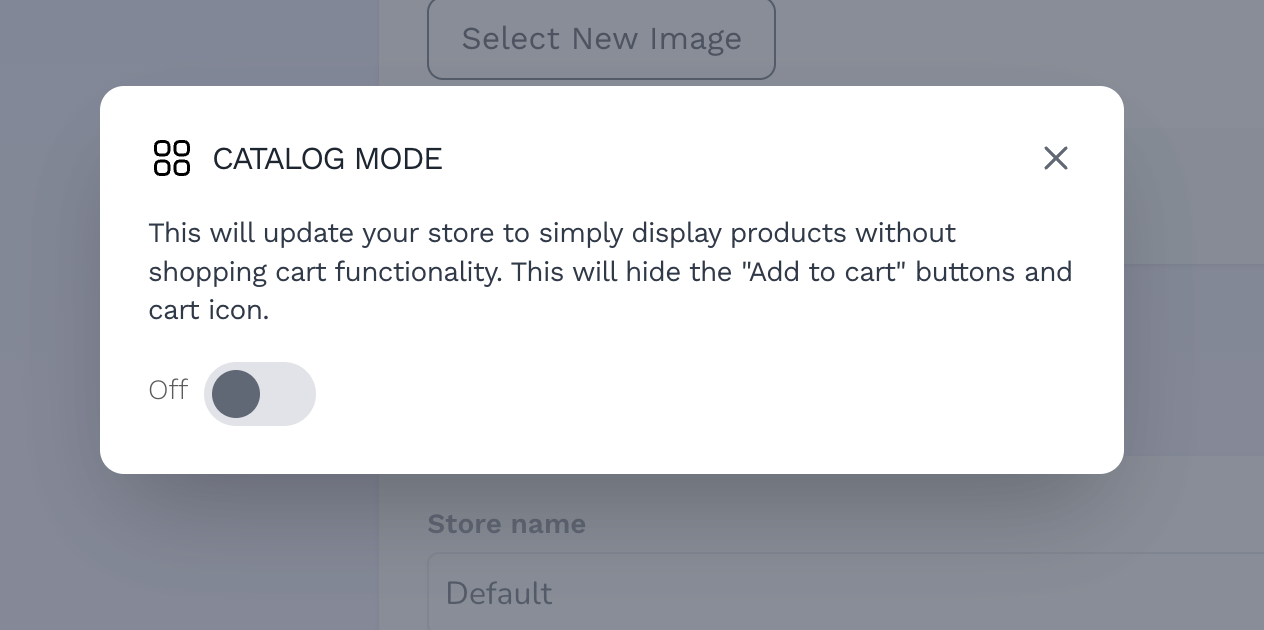
Catalog mode
You can switch as often as you like; test the catalog look for a seasonal drop, then flip back to Shop Mode the moment you're ready to take orders again.