How to redirect your non-www domain to www for your vendroad store

If you connected your online store to a custom domain and your bare domain (domain.com) is not working as expected. There are two ways to fix this.
DNS provider redirect
The first thing to check if you can easily redirect on the website where you bought the domain. Visit where you registered your domain. Search for where to redirect your domain. Choose a permanent redirect (301 permanent redirect) and redirect your bare domain (domain.com) to your (https://www.domain.com).
If your domain registrar allows this, then this should fix it immediately.
However, some domain registrars such as Hostinger do not allow redirect to same domain. In this case, check the cloudflare redirect.
Cloudflare redirect
To use cloudflare for redirect, you will need a cloudflare account. Create one if you do not have one, it's free.
- Create an account / login to account
- If you are just creating an account, choose the option to add domain during onboarding. Cloudflare will scan your domain and suggest changing your
nameserversto point to cloudflare. - Go back to your domain registrar (i.e where you bought your domain) and update the
nameserversthere to thenameserverscloudflare gave you and save. (This will take some time to propagate but doesn't stop the next step) - Next go to cloudflare menu > Rules > Page rules and create a page rule
- Enter your domain:
domain.com/*in the domain field. - In the dropdown settings, select
Forwarding URLand Status code setting, select301 - Permanent Redirect - Enter the www url of your store that already works i.e
https://www.domain.com - Click Save and deploy
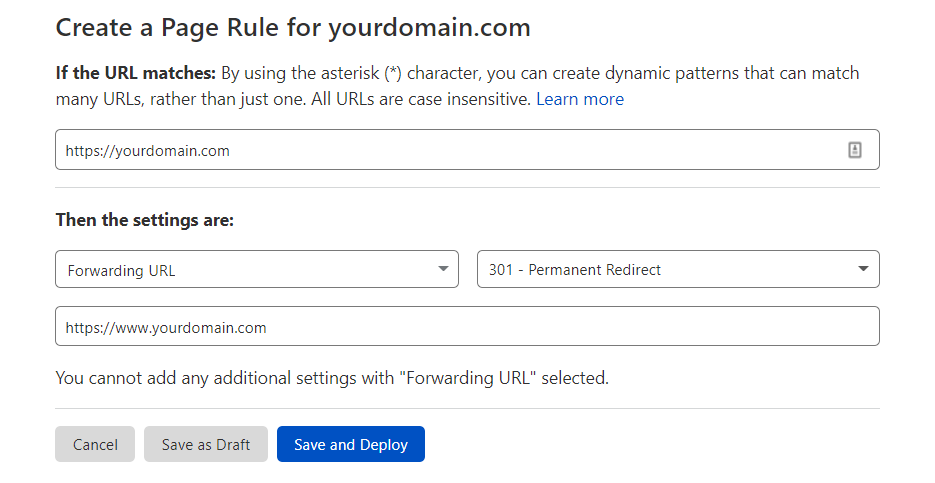
Setting page rule in cloudflare
That's it. This will automatically make all inquiries to your bare domain redirect to your www.domain.com.