Link in Bio Store: Sell Directly From Your Instagram or TikTok Bio | Vendroad
If you've been looking for a way to add a shop to your bio link, this is for you. If you sell from Instagram, TikTok, or Pinterest, you have probably wondered whether your bio link is working as hard as it could. You post content, people watch it, some of them tap your bio and then what happens?
For a lot of creators, the answer is: not much. The link goes to a homepage that is not set up for quick purchases, or a Linktree page with eight options and no clear direction. The moment of interest passes, and the sale does not happen.
A link-in-bio store is a specific solution to this problem and it is different from the link aggregators most people are using. This guide explains exactly what it is, how it differs from a link hub, who needs one, and how to set one up.
The short version: a link-in-bio store lets your followers buy your products directly from the page your bio link opens. A link aggregator like Linktree just gives them a list of destinations to click through to. If you sell things, these are very different tools. To create a link in bio store, visit vendroad.com/linkinbio
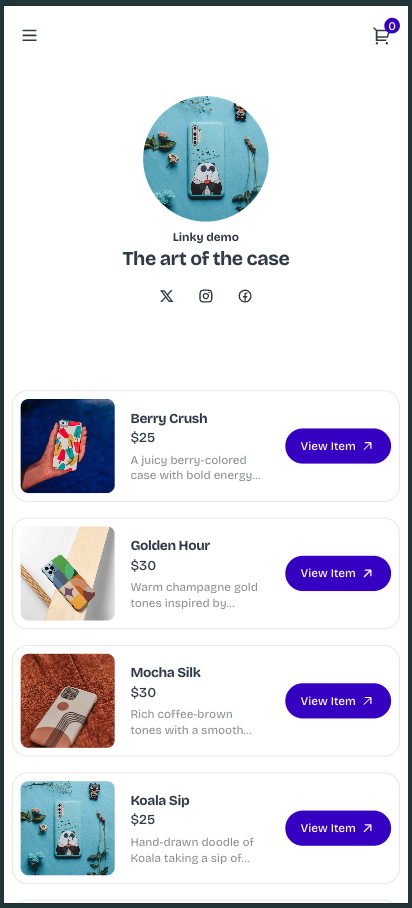
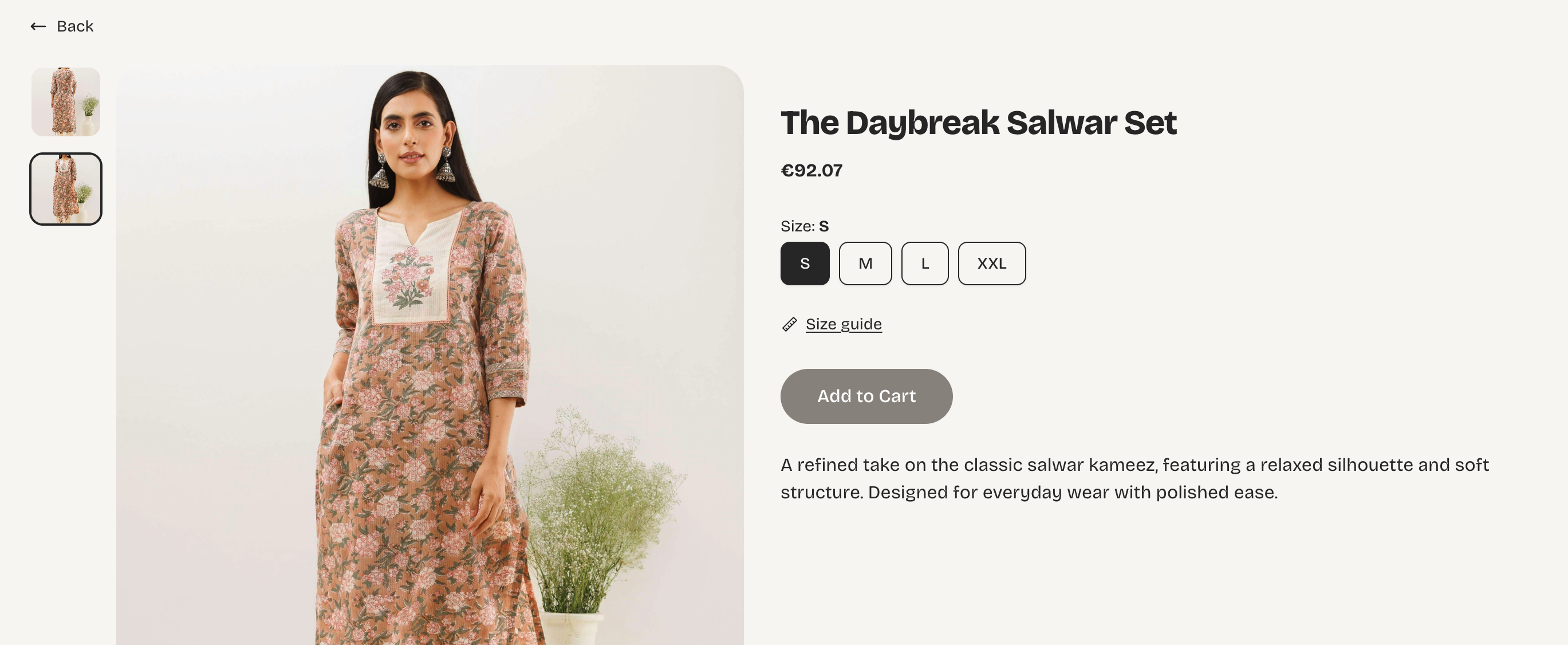
Sample of a link in bio store created using the Linky theme on Vendroad
What Is a Link-in-Bio Store?
A link-in-bio store is a mobile-optimised storefront designed to live at the URL you put in your social media bio. When someone taps your bio link on Instagram or TikTok, instead of arriving at a generic homepage or a list of links, they land on a page where they can see your products, their prices, and buy immediately.
The key feature that makes it a store rather than a link page is the ability to purchase directly. A link-in-bio store includes product listings with photos and descriptions, a shopping cart, and payment processing. A visitor who arrives at your bio link can complete a purchase without visiting any other page.
This matters because of how social media traffic behaves. Someone who sees your Reel about a new candle you just made and taps your bio link is warm and ready to act. If the page they land on makes it easy to buy that candle immediately, a meaningful percentage will. If the page requires them to navigate elsewhere, find the product, and start again, most of them will not.
The moment of interest is brief. A link-in-bio store is designed to capture it. A link aggregator or homepage redirect it.
What Is Link in Bio Shopping?
Link in bio shopping is exactly what it sounds like: the ability for your followers to shop your products directly through the link in your bio, without leaving their phone, without being sent to a marketplace, and without extra steps between seeing something and buying it.
It is distinct from standard link-in-bio tools. A link hub like Linktree handles navigation; it points people to places. Link in bio shopping handles transactions, it lets people buy. For a creator or small business that posts about products, the difference is the difference between getting clicks and getting sales.
The phrase means different things in different contexts. On TikTok Shop or Instagram Shopping, "link in bio shopping" might mean directing followers to a marketplace product page. But an independent link-in-bio store (one you own) keeps the entire transaction on your terms: your brand, your customer data, your repeat buyer relationship. That is a meaningfully different outcome.
Link-in-Bio Store vs Link Hub: What Is the Difference?
Most people who have a bio link are using a link aggregator, Linktree being the most recognised, though there are dozens of alternatives. It is worth understanding clearly what these tools do and do not do before deciding which is right for you.
Link hubs (Linktree and similar tools)
A link hub gives you a single URL that opens a page containing multiple buttons, each linking to a different destination. You might have a link to your latest YouTube video, your Etsy shop, your newsletter signup, and your website. It is a directory of places to go.
Link hubs are useful when you genuinely need to direct your audience to multiple different places and cannot choose between them. They are not designed for selling; there is no product display, no cart, and no checkout.
Link-in-bio stores
A link-in-bio store is a purpose-built storefront. It shows your products with photos and prices, it has a cart and checkout built in, and it is optimised for mobile visitors who are arriving directly from social media. It may also include links to other destinations, but selling is its primary function.
In 2026, the clearest distinction is this: if your goal is to convert your social following into buyers, you need a store. If your goal is to point people in multiple directions, you need a link hub. If you are a creator who sells products, you probably need both or a store that includes a few outbound links alongside your products.
Link Hub vs Link-in-Bio Store at a Glance
| Link hub (e.g. Linktree) | Link-in-bio store | |
|---|---|---|
| Can sell products | No | Yes |
| Accept payments | No | Yes |
| Product photos displayed | No | Yes |
| Multiple destination links | Yes | Yes (+ shop) |
| Mobile optimised | Yes | Yes |
| Matches your brand | Basic customisation | Full brand control |
| WhatsApp integration | Link only | Built in (Vendroad) |
| SEO benefit | None | Builds your store authority |
| Best for | Sharing multiple links | Selling products |
Do You Actually Need a Link-in-Bio Store?
Not everyone does. The honest answer depends on what you are trying to achieve with your social following.
You need a link-in-bio store if:
- You sell physical products - prints, ceramics, jewellery, candles, clothing, skincare, food
- You sell digital products - downloads, templates, presets, art files, courses
- You regularly post content about your products and your followers ask where they can buy
- You are currently sending bio link traffic to your Etsy shop and want to build a brand people remember
- You want to own your customer relationships rather than relying on a marketplace
You probably do not need a link-in-bio store if:
- You are a service provider whose bookings or enquiries happen via email or a booking tool
- You are a content creator who monetises through brand deals rather than direct product sales
- You are building an audience but do not yet have products to sell
If you are unsure, ask yourself: do people ever ask you in comments or DMs where they can buy something you have shown? If yes, a link-in-bio store is the right answer to that question.
If you are already sending bio link traffic to your Etsy shop, you are building Etsy's customer base, not yours. A link-in-bio store that you own means every buyer becomes your customer with their email address and order history in your dashboard, not Etsy's.
How to Set Up a Link-in-Bio Store With Vendroad
Vendroad's link-in-bio store theme (see vendroad.com/linkinbio) is built for creators and small businesses who drive traffic from social media. It is mobile-first, fast to load, and takes less than 30 minutes to set up from scratch. Here is how:
1. Start with a free account
Vendroad's free plan lets you list up to five products with no monthly fee and no platform transaction fee (see vendroad.com/pricing). For most creators who are testing the concept, five products is enough to prove that the approach works before committing to a paid plan.
2. Choose a theme that matches your social aesthetic
Your link-in-bio store should feel like an extension of your Instagram or TikTok profile - the same colours, the same fonts, the same overall vibe. A store that looks disconnected from your feed creates friction. Pick a clean, mobile-first theme and customise it to match your brand. We recommend the Linky theme or Instagrid theme!
3. Add your best-performing products first
Do not add everything at once. Start with the three to five products you mention most in your content - the ones your audience already asks about. These are your highest-conversion products because your followers have already seen them in context and are warm to them.
4. Connect your payment method
Link Stripe or set up bank transfer through your Vendroad dashboard (see vendroad.com/features). This is the step that turns your store from a display into a sales tool. Test a complete purchase yourself before sharing the link.
5. Put your store link in every bio
Replace your current bio link on Instagram, TikTok, Pinterest, and anywhere else your audience finds you. One link, one destination: your store. Update your bio text to reference it directly, not a generic 'check the link' but something specific like 'new print drop - shop in bio' or 'ceramics available - link below.'
6. Reference your store link in your content
Tell people specifically what they will find when they tap. 'The candle in this video is in my shop - link in bio' converts better than a generic 'link in bio' at the end of a caption. The more directly you connect the content to the store, the higher the click-through rate.
What Makes a Link-in-Bio Store Actually Convert
The technical setup is only half of it. What separates a bio link that generates sales from one that gets clicks but no revenue comes down to three things:
Speed and simplicity
Your store must load fast and be easy to navigate on a phone. If a visitor has to wait more than two seconds or scroll through more than one screen to find what they came for, most of them will leave. Keep your featured products at the top, your prices visible immediately, and your checkout as short as possible.
Consistency between content and store
When someone taps your bio link, they should arrive at a store that looks and feels like the account they just came from. A mismatch in visual style (different colours, fonts, or tone) breaks the trust that your content built. The transition from Instagram to your store should feel seamless.
Regular updates
A bio link store that never changes stops driving sales because there is nothing new to discover. Update your featured products to match what you are currently posting about. If your content this week is about a new collection, your store should reflect that. The closer the match between content and store, the higher the conversion.
Link-in-Bio Store vs. a Full Ecommerce Website: What Is the Difference?
This is a question that comes up naturally once your link-in-bio store starts working. A link-in-bio store is built for social media traffic, fast, mobile, impulse-driven. A full ecommerce website is built for everything else: Google search, repeat visitors, email traffic, and customers who want to browse a larger catalogue at their own pace.
The two are not competitors. Most successful independent sellers use both. The link-in-bio store handles social media conversion, it captures the warm traffic from your content. The full ecommerce website builds long-term SEO, serves repeat customers, and gives you a home on the web that isn't dependent on any social platform. If you want to understand how a full store compares to the major platforms, the ecommerce website builder guide covers what to look for.
Frequently Asked Questions
What is the difference between a link-in-bio store and Linktree?
Linktree is a link aggregator - it gives visitors a page with multiple buttons, each linking to a different destination. A link-in-bio store is a shoppable storefront where visitors can browse products, add them to a cart, and complete a purchase directly. If you sell products, these serve very different purposes. Linktree is for directing traffic. A link-in-bio store is for converting it.
Can I use a link-in-bio store on TikTok?
Yes, but TikTok requires either a business account or at least 1,000 followers on a personal account before you can add a clickable bio link. Once you have access, your Vendroad store URL is the link to use. TikTok traffic tends to be impulse-driven, so a fast-loading, mobile-first store with clear pricing converts particularly well from TikTok.
How many products should I feature in my link-in-bio store?
Three to five products is the sweet spot for the bio link landing experience. Enough to show range, not so many that visitors are overwhelmed or cannot decide. Lead with your current bestsellers or whatever you have most recently posted about. You can always have more products deeper in the store -- the bio link view is the front window.
Is a link-in-bio store free?
Vendroad offers a free plan with up to five products, full payment processing, and no platform transaction fee. This is enough to test the concept and generate your first sales without any monthly commitment. Paid plans start at $7 per month for larger product catalogues.
What is the best link-in-bio store for creators who sell physical products?
For creators selling physical products, Vendroad's link-in-bio store is built specifically for this use case. It is mobile-first, includes WhatsApp chat so buyers can ask questions before purchasing, and has no platform transaction fees. It is designed for the way social media traffic behaves -- fast, visual, and mobile.
Turn your bio link into a store
Vendroad's link-in-bio store is built for creators who sell. Mobile-first, fast to set up, and designed to convert social media traffic into real sales. Start free with up to 5 products - no credit card required.